Paid, but Premium is still missing?
Patreon can show an active membership before Discord is actually linked. Connect the same Discord account you use with SuccubusBot, then give your perks a few minutes to sync.
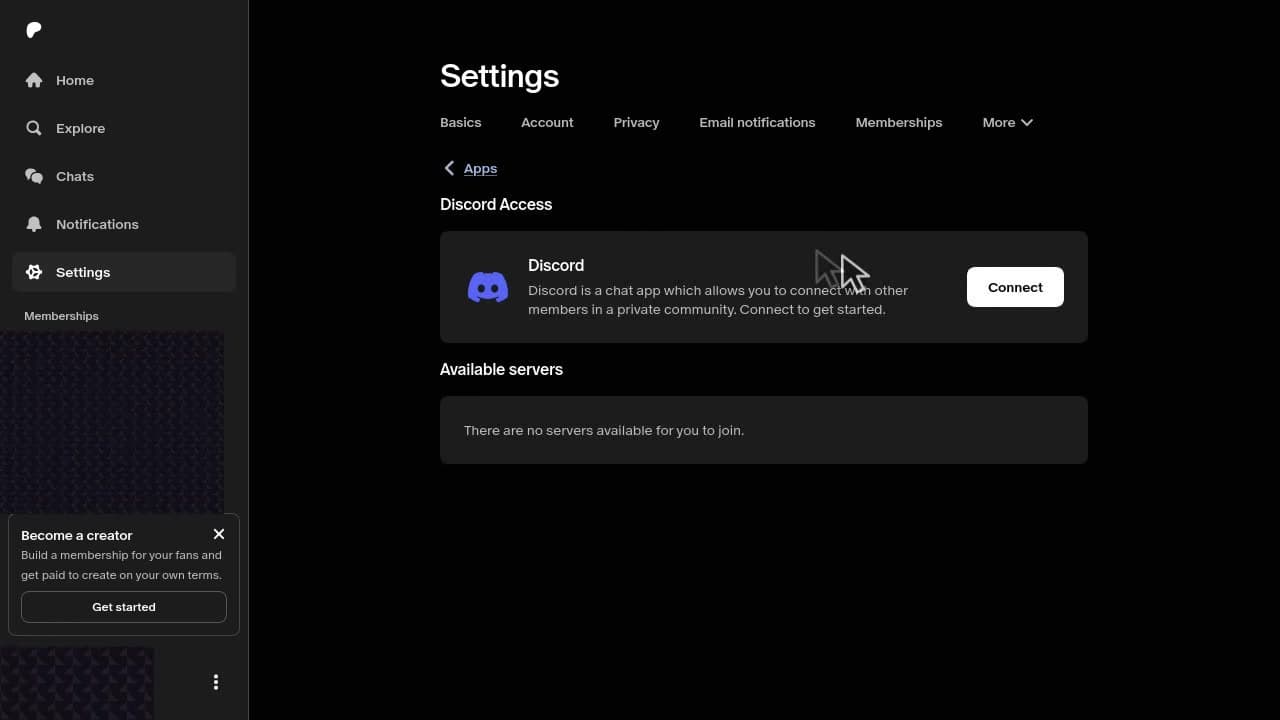
Open Patreon Connected AppsConnect the right Discord account
- 1
Open Connected Apps
Sign into the Patreon account that holds your active SuccubusBot membership.
- 2
Choose Discord
Select Discord, then connect the account you use with SuccubusBot.
- 3
Authorize and wait
Finish Discord authorization and allow a few minutes for SuccubusBot to apply your personal perks.
Still stuck?
Patreon keeps opening the app
The Patreon app may hide the Discord setting. Paste the address below into a browser. If mobile still forces the app open, use a desktop browser or temporarily disable Patreon link opening in your device settings.
https://www.patreon.com/settings/appsDiscord is connected, but perks are missing
Confirm Patreon is connected to the same Discord account you use with SuccubusBot. If the membership is active and nothing changes after a few minutes, the community team can check the remaining activation path with you.
Need a human to look at it?
Tell us that your Patreon membership is active and whether Discord appears under Connected Apps. Do not send payment details or private account credentials.
Ready to meet Succubus?
Breathe life into characters, lore, and worlds.
Ready to Experience the Future of Roleplay?
Join thousands of users already enjoying the most immersive AI experience available on Discord.